Installation
There are several steps required to install and configure the OSC and its resources.
Locating Configuration Files
There are two core OSC files that need to be placed locally on the machines hosting the OIPA application.
- osc.properties
- service-registry.xml.
Values and settings for these files will be referenced throughout the documentation. Refer the below for OSC Property Values and Service Registry tags.
osc.properties
### Required Values ###
# The following values must be set to enable OSC.
# Service Description file
services.file=/u01/oracle/lib/OSC/Properties/service-registry.xml
# File or db loading for templates
template.source=file
# For File based loading, set the following to the templates directory, ignored otherwise
/oracle/lib/OSC/Templates
# For DB loading, the following value limits how often the db will be polled for updates (Default, 10 min)
#template.minReadInterval=60000
### SOAP Security ###
# The following is only relevant if using security with SOAP.
# Constructor - Builds the message - default is FreeMarker
factory.constructor=com.oi.osc.constructor.FreeMarkerConstructor
# Operator - Delivers the message - default SOAP Operator
#factory.operator=com.oi.osc.operators.SOAPOperator
# Security - Storage of passwords - default OWM Provider
factory.security=com.oi.osc.security.CleartextSecurityProvider
# Security Factory determines how/where the OSC loads passwords
# Default:
# factory.security=com.oi.osc.security.WalletSecurityProvider
# Optional: Disables obfuscated passwords and uses passwordKey directly
#factory.security=com.oi.owsc.security.CleartextSecurityProvider
# The following values are required for the default (Wallet based) security settings
#wallet.path=/opt/Oracle/OIPA/osc/osc.wallet
#wallet.key=S3cr3t!
### Cache Settings ###
# If there is a reason to tweak cache settings, here they are
# Sets the implementation of the local, non-serialized, cache
#cache.local.type=com.oi.osc.cache.LRUCache
cache.local.type=com.oi.osc.cache.NoCache
# Sets the implementation of the distributed cache
#cache.distributed.type=com.oi.osc.cache.CoherenceCache
cache.distributed.type=com.oi.osc.cache.NoCache
# LRU min/max settings are per sub-cache
# OSC_JMS stores local copies of JNDI resources related to the JMS Service
#cache.lru.OSC_JMS.initSize=100
#cache.lru.OSC_JMS.maxSize=1000
# Coherence is configured using settings in the global coherence config.
# Templates are stored in the distributed cache named OSC_Templates
service-registry.xml
<Services>
<Service type="soap" id="PasFileReceivedT">
<TemplateName>PasFileReceivedTemplate.ftl</TemplateName>
<SecurityType>XWSS</SecurityType>
<XWSSConfig>/u01/oracle/lib/OSC/Templates/user_authenticate_client.xml</XWSSConfig>
<Username>qatester3</Username>
<PasswordKey>qatester3</PasswordKey>
<WSDLLocation>http://129.213.106.138:8112/PASJava/FileReceived?wsdl</WSDLLocation>
<ServiceName>{http://FileReceived}FileReceived</ServiceName>
<ServicePort>{http://FileReceived}PasFileReceivedPort</ServicePort>
</Service>
<Service type="soap" id="pasfilereceived">
<WSDLLocation>http://129.213.106.138:8112/PASJava/FileReceived?wsdl</WSDLLocation>
<ServiceName>{http://FileReceived}FileReceived</ServiceName>
<ServicePort>{http://FileReceived}PasFileReceivedPort</ServicePort>
<SecurityType>HTTP</SecurityType>
<Username>qatester3</Username>
<PasswordKey>qatester3</PasswordKey>
<TemplateName>PasFileReceivedTemplate.ftl</TemplateName>
</Service>
<Service id="greetingsSimpleFile" type="file">
<TemplateName>Greetings.ftl</TemplateName>
<Directory>/u01/oracle/lib/OSC/GeneratedFiles</Directory>
<FileNameType>Simple</FileNameType>
<FileName>greetingsSimpleFile</FileName>
</Service>
<Service id="greetingsRandom" type="file">
<TemplateName>Greetings.ftl</TemplateName>
<Directory>/u01/oracle/lib/OSC/GeneratedFiles</Directory>
<FileNameType>Random</FileNameType>
</Service>
<Service id="greetingsReference" type="file">
<TemplateName>Greetings.ftl</TemplateName>
<Directory>/u01/oracle/lib/OSC/GeneratedFiles</Directory>
<FileNameType>Reference</FileNameType>
<FileName>GreetingsFile</FileName>
<ReplaceExisting>true</ReplaceExisting>
</Service>
<Service id="greetingsDefault" type="file">
<TemplateName>Greetings.ftl</TemplateName>
<Directory>/u01/oracle/lib/OSC/GeneratedFiles</Directory>
</Service>
<Service id="greetings" type="jms">
<TemplateName>Greetings.ftl</TemplateName>
<ConnectionFactory>java:openejb/Resource/OSCConnectionFactory</ConnectionFactory>
<Destination>java:openejb/Resource/OSCQueue</Destination>
</Service>
</Services>
OSC Properties
The osc.properties file contains settings that control how OSC will execute. This file is generally configured at the beginning of a project, and will likely be updated rarely.
This file needs to be located on the JVM classpath. This is typically achieved by adding it to the OIPA properties directory, or by creating an OSC-specific directory and adding it to the classpath.
Once this file is configured, it can generally be deployed to all environments without modification.
When configuring for WebSphere, comment out the Wallet section in osc.properties. A sample configuration of osc.properties is below:
- Service Description fileservices.file=/opt/oracle/osc/osc/service-registry.xml# File or db loading for templatestemplate.source=file# For File based loading, set the following to the templates directory, ignored otherwisefreemarker.templateDir=/opt/oracle/osc/osc/templates/
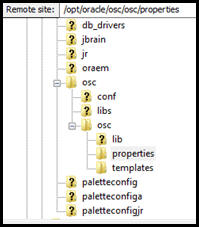
Figure 1: File structure on the server
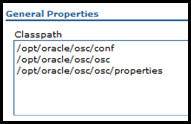
Figure 2: Classpath on the server
Service Registry
The service-registry.xml file contains a list of service definitions used in OSC. This file is updated as new services are added.
The location of this file is defined in osc.properties. Set services.file equal to the path to this file.
Because this file contains environment-specific data, migration between environments should be manually reviewed. Typically, there will be different endpoint instances serving Dev, QA, Production, etc., and this file abstracts those concerns from the rest of the configuration.
Configuring the Template Store
The OSC can retrieve message templates from either the local file system or a database. Using a local file system is generally the faster, simpler option, but a database may be a better solution for multi-cluster machines, or where access to local storage is restricted.
File-Based Storage
To enable file-based storage:
- Create a directory to hold the templates.
- Add template.source=file to osc.properties
- Add freemarker.templateDir equal to the directory from step 1 to the osc.properties.
Database-Based Storage
To enable database-based storage:
- Create the table using the schema below
- Create a JNDI bound JDBC resource named OSCDS that points to the database.
- Add template.source=db to the osc.properties file.a.Optionally, configure template.minReadInterval to restrict how often the plugin will check for a new version of the template in the database. The value is given in milliseconds, and the default setting is 60000, i.e. 10 minutes.
OSC Database Schema
CREATE TABLE OSCTemplate (
TemplateID varchar2 (40) NOT NULL,
TemplateData CLOB NOT NULL,
UpdatedGMT timestamp NOT NULL,
primary key (TemplateID)
Basic File Layout
When using file-based template storage, most users will find the following to be the most convenient deployment structure.
OSC File Layout
/opt/Oracle/oipa (a.k.a. OIPA_Home)
| - osc
| - service - registry.xml
| - properties
| - | - osc.properties
| - templates
The properties directory is added to the JVM classpath entry. Templates are stored in the templates directory, the location of which is specified in the osc.properties file.